

AI Browser Agents are intelligent software systems that can understand instructions, navigate websites, interact with webpages, and complete multi-step browser tasks with minimal human assistance. Unlike traditional browser automation tools, these systems combine AI reasoning, natural language commands, computer vision, and browser control to perform actions such as clicking buttons, filling forms, collecting information, and navigating complex websites.
Modern AI Browser Agents are making autonomous browsing and web automation more practical for individuals and businesses. They can support AI research, data extraction, competitive intelligence, workflow automation, online shopping, testing, and repetitive business processes. By understanding webpage context and adapting to changing interfaces, browser agents can turn simple instructions into complete automated workflows.
AI Browser Agents – Core Concepts
At their core, AI Browser Agents combine AI agents with browser automation to perform goal-oriented tasks on the web. Instead of following only fixed instructions, autonomous browser agents can interpret intent, create an action plan, interact with webpages, evaluate results, and adjust their approach when something changes.
These systems are often described as AI-powered browsers, agentic browsers, autonomous browser agents, AI web agents, or intelligent web agents. Their architecture commonly involves LLM agents, task planning, action planning, contextual reasoning, task execution, result validation, agent memory, and context awareness. A planner-actor-validator loop can allow an agent to decide what to do, perform an action, and verify whether the result is correct.
Browser Automation & Web Navigation
One of the most important capabilities of AI Browser Agents is automated web navigation. An agent can open a browser session, navigate between pages, identify interactive elements, click buttons, enter information, and complete multi-step browser workflows according to a user’s goal.
Traditional browser automation usually depends on predefined selectors and fixed workflows. AI-assisted browsing can be more flexible because the agent can analyze the page and decide which action is appropriate. This makes browser interaction useful for website navigation, page navigation, click automation, form automation, page interaction, and browser task automation.
AI Agent Architecture & Reasoning
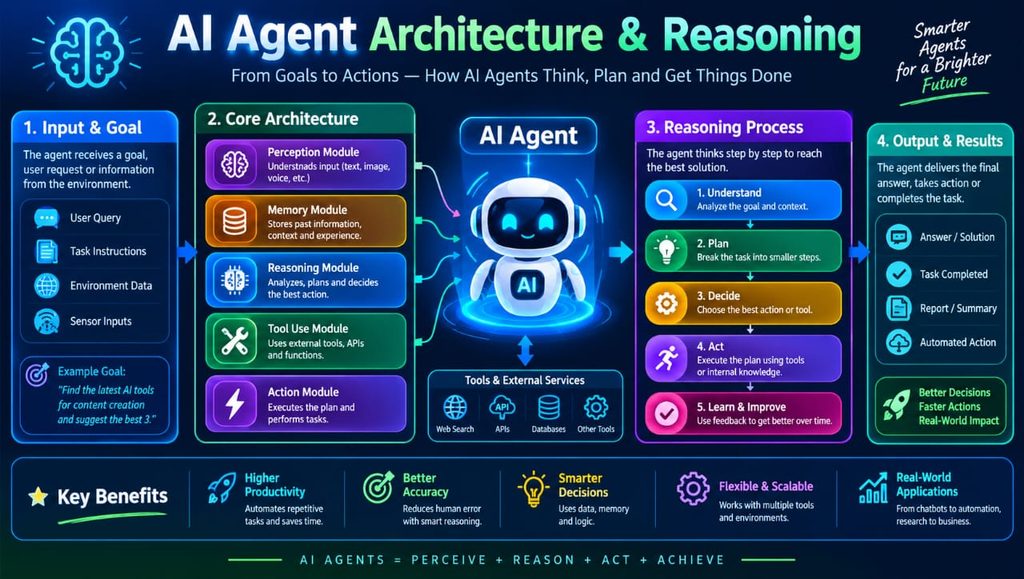
The intelligence behind AI Browser Agents comes from the combination of large language models, reasoning systems, and browser-control mechanisms. An AI agent first interprets a user’s goal, breaks it into smaller tasks, determines the required actions, and then executes those actions inside a browser.
LLM reasoning enables agents to understand natural language instructions and make decisions based on webpage context. AI reasoning, task planning, adaptive execution, autonomous decision making, and result validation are important for completing complex tasks. Agent memory can also help maintain information during longer workflows, while human-in-the-loop automation provides an opportunity for users to review sensitive actions before completion.
Web Scraping & Data Extraction
AI Browser Agents can simplify web scraping and automated data extraction by navigating websites and collecting information from pages. Instead of relying entirely on fixed scraping rules, an AI web scraping system can understand webpage content and identify relevant information based on a natural language objective.
This can be useful for collecting structured data, website data, pricing data, product data, competitor data, and other business information. AI-powered extraction can also work with dynamic website scraping and JavaScript-heavy websites where page content changes after loading. The resulting information can be transformed into structured output, JSON, Markdown, or other LLM-ready data formats.
Browser Interaction & Page Understanding
Effective AI Browser Agents need to understand what is displayed on a webpage before deciding what action to take. They may use DOM analysis, the accessibility tree, webpage analysis, screenshot analysis, and computer vision to understand page structure and interactive elements.
The DOM provides information about webpage elements, while ARIA roles and accessibility information can help an agent identify buttons, links, inputs, menus, and other controls. Visual page understanding adds another layer by allowing an agent to interpret screenshots and recognize elements that may be difficult to identify through traditional selectors alone.
Form Filling & Workflow Automation
Businesses often spend significant time completing repetitive online forms, transferring information, and performing routine browser workflows. AI Browser Agents can automate these activities by understanding form fields and entering appropriate information according to user instructions.
Common applications include online forms, HR onboarding, insurance forms, government forms, job applications, invoice processing, and data transfer between legacy systems. This type of workflow automation can complement robotic process automation (RPA) by making automated processes more adaptable to websites that frequently change their layouts.
AI Research & Information Gathering
AI Browser Agents can also act as research assistants by performing AI research and information gathering across multiple websites. An agent can discover sources, navigate different pages, extract relevant facts, compare information, and organize findings into a research report.
This capability is valuable for competitive intelligence, competitor research, market research, academic research, news research, and real-time web research. Autonomous research workflows can reduce the amount of manual browsing required for repetitive information-gathering tasks while allowing users to focus on analyzing the final results.
Browser Agents for Productivity
For everyday users, AI Browser Agents can support personal productivity by automating common online activities. Instead of manually navigating several websites, users can provide natural language instructions describing what they want to accomplish.
Potential applications include email automation, email triage, response drafting, calendar management, online shopping, travel booking, hotel booking, flight comparison, grocery ordering, and social media management. These capabilities can turn repetitive daily browsing into automated tasks and allow personal AI assistants to handle routine browser workflows.
See more:AI Browser Agents
Automated Testing & QA
Software teams can use AI Browser Agents for automated testing and quality assurance. AI testing systems can navigate web applications, interact with user interfaces, execute test scenarios, and identify unexpected behavior.
Browser testing can support end-to-end testing, UI testing, exploratory testing, visual regression testing, and browser compatibility testing. AI-generated test cases and adaptive test scripts can potentially reduce the effort required to maintain traditional automation when application interfaces change.
Browser Agent Frameworks & Developer Tools
Developers have access to several tools and frameworks for building browser automation and AI agent systems. Popular technologies include Browser Use, Stagehand, Agent Browser, Skyvern, Firecrawl, Browserbase, Steel, Playwright, Puppeteer, and Selenium.
These platforms and frameworks provide different approaches to browser control, web scraping, automation, and AI integration. Developers may use Python automation, TypeScript SDKs, browser APIs, CLI browser control, headless browsers, or open-source AI frameworks depending on their project requirements.
Browser Infrastructure & Cloud Automation
Large-scale AI Browser Agents require reliable browser infrastructure to execute multiple browser sessions. Cloud browser platforms provide managed browsers, isolated environments, session management, and scalable browser infrastructure for applications that need many simultaneous sessions.
Cloud-based automation can provide persistent browser sessions, session recording, browser sandboxes, and parallel browser sessions. Developers can also use self-hosted browser infrastructure when they need greater control over data, networking, storage, or security requirements.
Multi-Tab & Stateful Browsing
Complex online tasks frequently require more than one webpage. AI Browser Agents can support multi-tab browsing and cross-page navigation while maintaining the context of an ongoing workflow.
Persistent browser profiles can retain login state, cookies, local storage, and other session information when appropriately configured. Stateful workflows are particularly useful when an agent needs to move between multiple websites or pages without losing its browsing context. Session persistence and cross-session memory can make long-running workflows more practical.
Natural Language Browser Control
A major advantage of AI Browser Agents is natural language browser control. Users can describe a goal using ordinary language instead of writing detailed automation scripts or manually specifying every browser action.
Natural language automation allows instructions such as finding information, completing a form, comparing products, or navigating a website to be translated into browser actions. This approach makes conversational browser automation accessible to people who may not have programming experience.
AI Models & Browser Agents
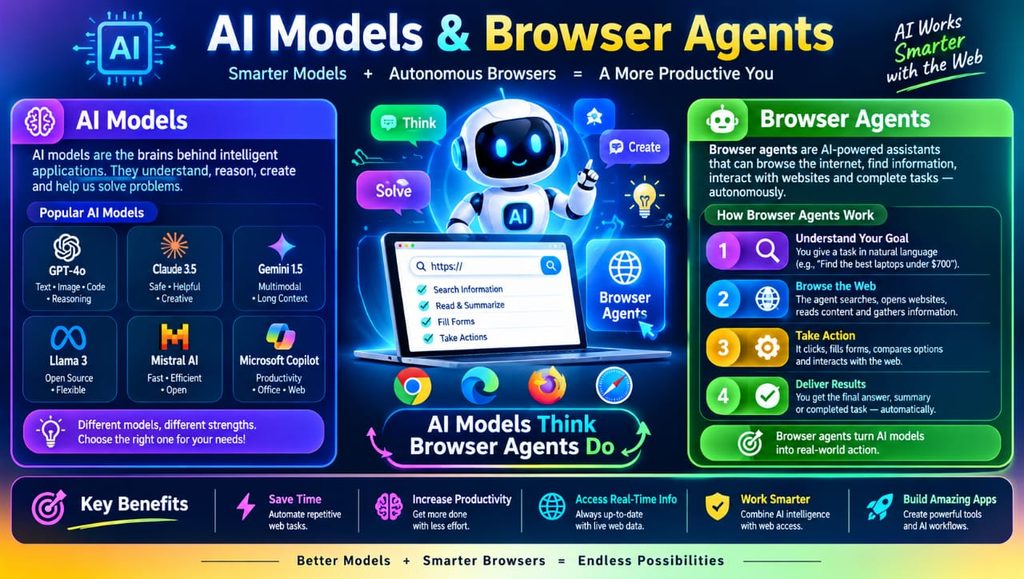
Different AI models can power browser agents depending on the complexity of the task. Large language models provide language understanding and decision-making capabilities, while multimodal AI and computer vision models can help agents understand visual webpages.
GPT models, Claude models, Gemini models, local AI models, and other model-agnostic systems can potentially be integrated with browser automation. Vision-language models are particularly useful when an agent needs to understand screenshots, page layouts, icons, images, or other visual information.
Security, Privacy & Reliability
Security is a critical consideration when using AI Browser Agents, especially when agents can access accounts, sensitive websites, or private information. Secure browser sessions, isolated environments, authentication controls, access control, cookie management, and browser sandboxing can help reduce security risks.
Another important issue is prompt injection, including indirect prompt injection. A webpage may contain malicious instructions designed to influence an AI agent. Reliable systems therefore need safeguards, permission controls, validation mechanisms, and appropriate human oversight. Privacy, compliance, login security, and secure automation should be considered before deploying browser agents for sensitive workflows.
Benefits & Advantages
The biggest benefit of AI Browser Agents is their ability to reduce repetitive manual work. They can provide time saving, productivity improvement, faster workflows, scalable automation, and reduced operational effort.
Other advantages include intelligent automation, autonomous task completion, real-time interaction, flexible automation, adaptive workflows, and cost efficiency. For businesses, browser agents can automate repetitive processes while allowing employees to focus on tasks that require creativity, judgment, and human communication.
Challenges & Limitations
Despite their potential, AI Browser Agents are not perfect. AI browser agent limitations can include task failure, hallucinations, unreliable automation, LLM errors, authentication issues, CAPTCHA handling, and browser compatibility problems.
Websites can also change their layouts, selectors, content, or security systems, which may cause an automated workflow to fail. Dynamic websites and JavaScript-heavy applications can introduce additional complexity. Security risks, privacy concerns, infrastructure costs, and scaling challenges also need careful consideration before using autonomous agents in production environments.
1. What are AI Browser Agents?
AI Browser Agents are intelligent systems that use AI reasoning and browser automation to navigate websites, understand webpage content, and complete tasks based on natural language instructions.
2. How do AI Browser Agents work?
They typically interpret a user’s goal, create a task plan, analyze webpage content, perform browser actions such as clicking and typing, and validate the results. Some systems also use computer vision, DOM analysis, and accessibility information.
3. Can AI Browser Agents fill out online forms?
Yes. They can be designed for automated form filling, data entry, job applications, HR onboarding, invoice processing, insurance forms, and other multi-step workflows, although sensitive actions may require human approval.
4. Are AI Browser Agents safe to use?
They can be used safely when proper security measures are implemented. Browser sandboxing, isolated sessions, access controls, authentication safeguards, privacy controls, and human-in-the-loop approval can help reduce security and privacy risks.
5. What tools can developers use to build browser agents?
Developers can work with technologies such as Playwright, Puppeteer, Selenium, Browser Use, Stagehand, Skyvern, Browserbase, Firecrawl, and other browser SDKs or AI agent frameworks depending on their requirements.

